
History
Every transcription you've ever made, all in one place.
Overview
History is your complete log of everything you've spoken through Lungoor Voice. Every time you record something it gets saved here automatically - so you can review, copy, switch styles, or reprocess any transcription at any time.
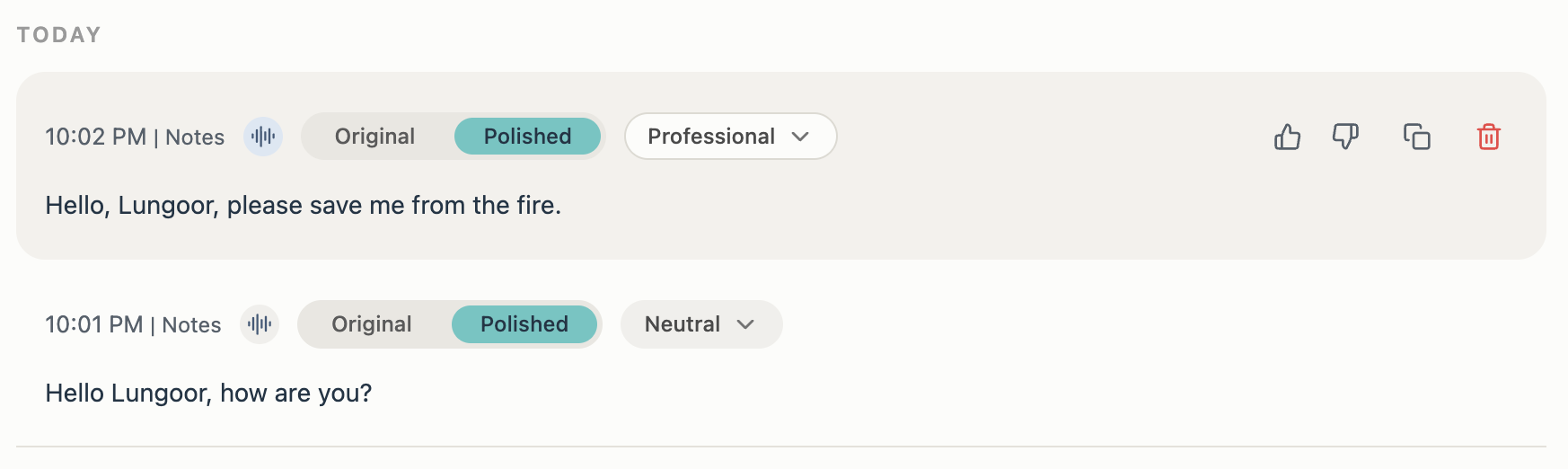
Reading a History Entry
Each entry in History shows you:
- The time it was created - for example, 10:02 PM
- The app that was active when you recorded - for example, Notes
- Two tabs: Original and Polished
- The active style that was applied - for example, Professional or Neutral
- Action buttons to interact with the entry
The Original Tab
The Original tab shows your raw, unprocessed speech exactly as Lungoor heard it - in the language and accent you naturally spoke in.
If you speak with a natural accent or mix languages, the Original transcript will reflect that authentically. It's your voice, untouched.
This is useful when you want to see exactly what you said before any style was applied.
The Polished Tab
The Polished tab shows the transcription after Lungoor has rewritten it using the style that was active at the time of recording.
This is the version that gets pasted into your app. It's clean, structured, and shaped to match your chosen tone and format.
The tab label always shows which style was applied. If your default style was Professional, the tab will say Professional. If it was Casual, it will say Casual.
Reprocess Any Transcription
Want to try a different style on an old transcription? Click the style dropdown and select a new one from your My Styles list.
Lungoor will instantly rewrite the transcription in the new tone without you having to re-record anything. This is powerful for repurposing the same voice note across different formats - send it as an email, a message, and a note all from one recording.
Copy and Delete
- Copy - click the copy icon to instantly copy the currently visible transcript (Original or Polished) to your clipboard, ready to paste anywhere
- Delete - click the trash icon to permanently remove the entry from your History. This cannot be undone, so make sure you no longer need it before deleting
Like and Dislike
Use the thumbs up and thumbs down buttons to give Lungoor feedback on transcriptions. Thumbs up means the transcription worked well. Thumbs down means something went wrong or the output wasn't what you expected.
Your feedback helps Lungoor learn and improve over time.
Tips
- Use Original to check exactly what you said if a transcription came out unexpectedly
- Use Reprocess to repurpose the same voice note across multiple formats and styles - no need to re-record
- Your History grows as you use Lungoor - go back anytime to find, review, or reuse old transcriptions
- History entries are sorted by date, with today's recordings at the top